Callan Group CommunicationsCallan Group Communications
  • Home
  • Services
    • Beyond the Boardroom
    • Print & Legacy Media
    • Digital Footprint
    • Your Marketing Team
    • Events & Cause Marketing
    • Association & Non-Profit Management
    • Seminars
    • MomPreneur
  • About The CGC Crew
    • Meet the CGC Crew
    • Testimonials
    • We Give
    • Marketing NEXT Expo
    • Employment
  • News & Events
    • News
    • Events
  • Shop
    • After Mom: an Insightful Journey to Healing After Death
    • “Universe Nudge” Blog
  • Contact
Callan Group Communications
  • Home
  • Services
    • Beyond the Boardroom
    • Print & Legacy Media
    • Digital Footprint
    • Your Marketing Team
    • Events & Cause Marketing
    • Association & Non-Profit Management
    • Seminars
    • MomPreneur
  • About The CGC Crew
    • Meet the CGC Crew
    • Testimonials
    • We Give
    • Marketing NEXT Expo
    • Employment
  • News & Events
    • News
    • Events
  • Shop
    • After Mom: an Insightful Journey to Healing After Death
    • “Universe Nudge” Blog
  • Contact
  • Home
  • How To
  • How to Add an Admin to Your LinkedIn Business Profile

How to Add an Admin to Your LinkedIn Business Profile

Diane Michael2025-01-30T11:30:48-05:00

How to Add an Admin to Your LinkedIn Business Profile

Managing your LinkedIn business page effectively requires teamwork, and sometimes, that means granting access to a trusted marketing agency (like Callan Group Communications) to handle updates, content, and engagement on your behalf. If you need to add an admin to your LinkedIn Company Page, follow these simple steps.

Step 1: Log into Your LinkedIn Account

Before you can add an admin, make sure you are logged into the LinkedIn account that has super admin access to your business page.

Step 2: Navigate to Your LinkedIn Business Page

  1. Click on “Me” in the top navigation bar.
  2. Under “Manage”, select your company page.

Step 3: Access Admin Tools

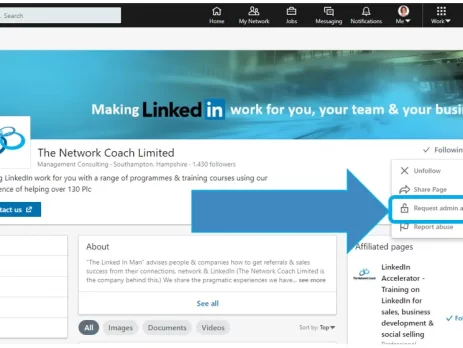
  1. Once on your company page, look for the Admin Tools dropdown in the top right corner.
  2. Click on “Manage admins” from the dropdown menu.

Step 4: Add an Admin

  1. Click on “Add Admin” in the top-right corner.
  2. In the search bar, type the name of the person you want to add (ensure they are connected with you on LinkedIn). Diane Michael: https://www.linkedin.com/in/callangroupcommunications/
  3. Select the appropriate admin role:

Select Super Admin – Full control over the page, including managing admins.

Step 5: Save Changes

After selecting the role, click “Save” or “Add” to confirm.

Step 6: Notify Your Admin

Once added, let the new admin know that they now have access. They can navigate to the business page under the “Manage” section of their LinkedIn profile.

Why Add Callan Group Communications as an Admin?

By adding our team as an admin, we can help:
✅ Post and schedule engaging content

✅ Manage comments and messages

✅ Optimize your page for better visibility

✅ Analyze page performance and adjust strategies accordingly

If you have any questions or need assistance, feel free to reach out. We’re happy to help streamline your LinkedIn marketing efforts!

January 30, 2025 By Diane Michael How To Advertising Daytona Beach, AssociationManagement, Callan Group, Callan Group Commnications, CallanGroup, CallanGroupCommunications, Diane Michael, dianemichael, Digital Di, domainhostingdaytona, Don't Be Prehistoric, emailnewsletters, Facebook Follows, FloDesk, GoogleMyBusiness, hootsuiteprosandcons, hostingDaytona, InstagramDaytonaBeach, LinkedInMarketingDaytona, linktree, Marketing Daytona, marketingconsulting, ReviewSites, ReviewSiteTurnKey, SEODaytona, Sign Up for Flodesk, Social Media Ormond Beach, surveysdaytonabeach, The Callan Group, UniverseNudge, websitesDaytona Comments Off on How to Add an Admin to Your LinkedIn Business Profile

Share this post

Facebook Twitter LinkedIn Google + Pinterest Email

Related Posts

How to Access Monthly Facebook Insights, Google Business Analytics, and Website Metrics using Google Analytics for Your Business
By regularly analyzing Facebook Insights, Google Business Profile Performance, and Google Analytics metrics, you can gain a comprehensive understanding of how users interact with your business across platforms. Use these insights to refine your marketing strategies and drive growth. You can start by setting a recurring date each month to collect and compare your analytics, and let data guide your business decisions! Here’s a step-by-step guide to accessing and analyzing these insights. Facebook Analytics Facebook offers detailed performance data through Meta Business...
December 9, 2024 By Diane MichaelHow ToComments Off
How to Sign Up for Flodesk and Add Our Affiliate Code
Flodesk is a user-friendly email marketing platform perfect for creating beautiful, engaging emails. Here’s how to sign up and apply CGC's discount code to your subscription. Steps: Visit Flodesk: Go to Flodesk. Sign Up: Click on Sign Up for Free or similar on the homepage. Fill in your details (name, email, password). Check for Verification Email: Go to your inbox and open the verification email from Flodesk. Click to verify your email. This should bring you back...
August 26, 2024 By Diane MichaelHow ToFlodesk Code, Flodesk Newsletters, Sign Up for FlodeskComments Off
How to Add an Admin to Your YouTube Account
Adding an admin to your YouTube Account allows others to manage your page, post updates, and edit. Here’s a simple guide to adding an admin.   Step 1: Sign in to YouTube Studio Open your web browser and go to YouTube. Click on your profile picture in the top-right corner. Select YouTube Studio from the dropdown menu. Step 2: Access Settings Once you're in YouTube Studio, look to the left-hand menu. Scroll to the bottom and click on Settings (it's a small...
October 29, 2024 By Sally JaducanHow ToComments Off
How to Add an Admin to Your Facebook Business Page
 Adding an admin to your Facebook Business Page allows others to manage your page, post updates, and respond to messages. Here’s a simple guide to adding an admin. Steps: Log in to Facebook: Go to Facebook. Sign in with your credentials. Access Your Business Page: Click on Pages in the left menu, and select the page you want to manage. Switch into the Page: Switching into the Page allows you to act as the page and not from...
August 26, 2024 By Diane MichaelHow ToAdd Admin to Facebook Business, FacebookBusinessAdminComments Off
How to Add Subtitles and an End Screen to Your Videos on YouTube
If you're creating video content for YouTube, you already know how important it is to keep viewers engaged—and coming back for more. Two of the simplest, most effective ways to do that? Subtitles and end screens. Adding subtitles helps make your content more accessible to a wider audience, including non-native speakers and the hearing impaired. Meanwhile, end screens are powerful tools for keeping viewers on your channel by prompting them to watch more videos, subscribe, or visit your website. Here’s a...
May 1, 2025 By Sally JaducanHow ToComments Off
How to Add a Manager to Google My Business Account
Google My Business (GMB) is essential for managing your online presence across Google, including Search and Maps. If you're collaborating with CGC or need help managing your GMB profile, adding a manager is a straightforward process. Here’s how to do it. Steps: Log in to Google My Business: Go to Google My Business. Sign in with the Google account associated with your business. Select Your Business: If you have multiple businesses, choose the one you want to manage from the...
August 26, 2024 By Diane MichaelHow ToAdd Admin to Google My Business, GoogleMyBusinessComments Off
We believe in building long lasting relationships. Newsletters are one way we like to stay in touch. We highlight proven marketing tips, our clients, community and our crew. Sign-up today with only your email address, it's FREE!

    Let Us Help You

    Feel free to stalk us! Facebook Twitter RSS Pinterest Youtube Instagram Linkedin Google +
    Callan Group Communications
    © 2016-2025 Callan Group Communications. All Rights Reserved.
    Privacy | Site Map