Ready to Advertise on ChatGPT? We’ll Help You Get Started.
ChatGPT Ads gives businesses another opportunity to reach potential customers where people are already searching for information, asking questions, and making decisions.
Before Callan Group Communications can help manage your ChatGPT advertising, your business needs to create its own OpenAI Ads Manager account, complete the required business and billing information, and give our team access.
The good news? You don’t have to figure out the advertising strategy yourself.
We’ll help with that part.
Here’s what we need you to do to get your account ready.
Step 1: Create Your OpenAI Ads Manager Account
Start by visiting:
Select Log In or Sign Up.
You’ll need an OpenAI account to access Ads Manager. If you already use ChatGPT, you can sign in with your existing OpenAI account. If you don’t have one, you can create an account during the sign-up process.
Important:
The business owner or an authorized representative of the business should create the advertising account.
This ensures that your business maintains ownership of its advertising account and billing information.
Callan Group Communications can be invited to the account after it has been created.
Step 2: Enter Your Business Information
During the setup process, you’ll be asked for information about your business.
Have the following information available:
- Business name
- Business website
- Business logo
- Industry
- Business country or region
- Currency
- Time zone
Review this information carefully before submitting your account.
Some account-level settings may not be easily changed after the account is created, so it’s important to make sure the information is accurate.
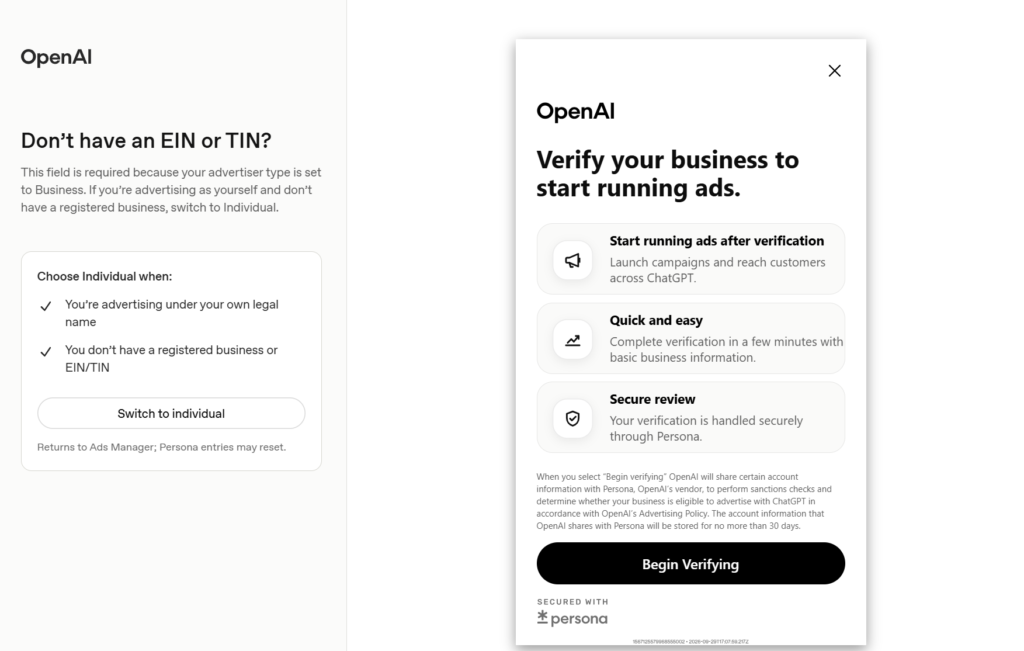
You may also be asked to complete an advertiser verification process. OpenAI uses this process to verify advertiser information and determine eligibility under its advertising policies.
Don’t worry if your account isn’t immediately ready.
Some advertiser accounts may go through a review process before full Ads Manager access is granted. OpenAI will contact the email address associated with the account when access is available.
Note: If you need to do an account verification, you will see this pop up on top of the screen under Settings -> General.
Clicking on “Continue verification will walk you through the necessary steps.

Step 3: Complete Your Account Information
Once you have access to Ads Manager, review your business information and make sure your account is set up correctly.
Go to:
Settings → General
Review your:
- Account Name
- Brand Name
- Legal Name
- Logo
Your Brand Name should reflect how you want your business represented in your advertising.
Your Legal Name should reflect your registered business name.
Step 4: Add Your Billing Information
Before your ChatGPT advertising campaigns can begin delivering, billing must be completed.
In Ads Manager, go to:
Billing
You’ll need to complete your billing profile and add a payment method.
You will need:
Billing Profile
- Business name
- Business/billing address
- Invoice delivery email
Payment Method
- Credit card information
- Billing address information
OpenAI’s current self-serve advertising setup uses a card-billed, postpay model. Your advertising spend accrues as campaigns deliver, and charges are applied to the payment method saved in Ads Manager.
Step 5: Invite Callan Group Communications
Once your advertising account and billing are set up, the final step is to give our team access.
In Ads Manager, go to:
Settings → Users → Invite
Enter:
thecallangroup@gmail.com
Then select the appropriate role.
For CGC to manage your advertising account, please select:
Admin
The current Ads Manager setup provides three account-level roles:
- Admin — Full access to the platform
- Member — Can create and manage campaigns
- Viewer — Can view advertising information
For ongoing campaign management by Callan Group Communications, Admin access is preferred so our team can access the account settings and supported user-management functions we may need.
Then send the invitation.
Step 6: Let Us Know Your Account Is Ready
Once you’ve completed the setup and invited:
thecallangroup@gmail.com
send us a quick message letting us know.
We’ll take it from there.
Our team can then work within your advertising account to help develop and manage your ChatGPT advertising strategy, including campaign planning, ad development, targeting, monitoring, and optimization.
Your ChatGPT Ads Setup Checklist
Before handing things over to CGC, make sure you’ve completed each of these steps:
☐ Created your OpenAI Ads Manager account
☐ Entered your business information
☐ Completed any required advertiser verification
☐ Confirmed your account name, brand name, legal name, and logo
☐ Created your billing profile
☐ Added your payment method
☐ Invited thecallangroup@gmail.com
☐ Assigned CGC the appropriate account role
☐ Notified CGC that the account is ready
A Note About Account Ownership
Your business should create and maintain ownership of its own advertising account and billing information.
This keeps your business in control of:
- Your advertising account
- Your billing information
- Your payment method
- Your advertising history
- Your campaign data
Callan Group Communications works as your marketing partner within the account.
You own the account. We help you make the most of it.
Need Help?
If you get stuck during setup, don’t worry.
Take a screenshot of the step you’re on and send it to the Callan Group Communications team.
We’re happy to help you get through the setup so we can get to the part that matters: putting your advertising strategy to work.
Ready to connect the dots?
Callan Group Communications
MORE THAN MARKETING.
We help businesses connect their website, search, content, social media, email, video, advertising, and strategy into a marketing system that tells a consistent story.