Callan Group CommunicationsCallan Group Communications
  • Home
  • Services
    • Beyond the Boardroom
      • Webinar Wednesday: Watch Videos from Our Association Allies
    • Print & Legacy Media
    • Digital Footprint
    • Your Marketing Team
    • Events & Cause Marketing
    • Association & Non-Profit Management
    • Seminars
    • MomPreneur
  • About The CGC Crew
    • Meet the CGC Crew
    • Testimonials
    • We Give
    • Marketing NEXT Expo
    • Employment
  • News & Events
    • News
    • Events
  • Shop
    • After Mom: an Insightful Journey to Healing After Death
    • “Universe Nudge” Blog
  • Contact
Callan Group Communications
  • Home
  • Services
    • Beyond the Boardroom
      • Webinar Wednesday: Watch Videos from Our Association Allies
    • Print & Legacy Media
    • Digital Footprint
    • Your Marketing Team
    • Events & Cause Marketing
    • Association & Non-Profit Management
    • Seminars
    • MomPreneur
  • About The CGC Crew
    • Meet the CGC Crew
    • Testimonials
    • We Give
    • Marketing NEXT Expo
    • Employment
  • News & Events
    • News
    • Events
  • Shop
    • After Mom: an Insightful Journey to Healing After Death
    • “Universe Nudge” Blog
  • Contact
  • Home
  • How To
  • How to Add an Admin to Your LinkedIn Business Profile

How to Add an Admin to Your LinkedIn Business Profile

Diane Michael2025-01-30T11:30:48-05:00

How to Add an Admin to Your LinkedIn Business Profile

Managing your LinkedIn business page effectively requires teamwork, and sometimes, that means granting access to a trusted marketing agency (like Callan Group Communications) to handle updates, content, and engagement on your behalf. If you need to add an admin to your LinkedIn Company Page, follow these simple steps.

Step 1: Log into Your LinkedIn Account

Before you can add an admin, make sure you are logged into the LinkedIn account that has super admin access to your business page.

Step 2: Navigate to Your LinkedIn Business Page

  1. Click on “Me” in the top navigation bar.
  2. Under “Manage”, select your company page.

Step 3: Access Admin Tools

  1. Once on your company page, look for the Admin Tools dropdown in the top right corner.
  2. Click on “Manage admins” from the dropdown menu.

Step 4: Add an Admin

  1. Click on “Add Admin” in the top-right corner.
  2. In the search bar, type the name of the person you want to add (ensure they are connected with you on LinkedIn). Diane Michael: https://www.linkedin.com/in/callangroupcommunications/
  3. Select the appropriate admin role:

Select Super Admin – Full control over the page, including managing admins.

Step 5: Save Changes

After selecting the role, click “Save” or “Add” to confirm.

Step 6: Notify Your Admin

Once added, let the new admin know that they now have access. They can navigate to the business page under the “Manage” section of their LinkedIn profile.

Why Add Callan Group Communications as an Admin?

By adding our team as an admin, we can help:
✅ Post and schedule engaging content

✅ Manage comments and messages

✅ Optimize your page for better visibility

✅ Analyze page performance and adjust strategies accordingly

If you have any questions or need assistance, feel free to reach out. We’re happy to help streamline your LinkedIn marketing efforts!


January 30, 2025 By Diane Michael How To Advertising Daytona Beach, AssociationManagement, Callan Group, Callan Group Commnications, CallanGroup, CallanGroupCommunications, Diane Michael, dianemichael, Digital Di, domainhostingdaytona, Don't Be Prehistoric, emailnewsletters, Facebook Follows, FloDesk, GoogleMyBusiness, hootsuiteprosandcons, hostingDaytona, InstagramDaytonaBeach, LinkedInMarketingDaytona, linktree, Marketing Daytona, marketingconsulting, ReviewSites, ReviewSiteTurnKey, SEODaytona, Sign Up for Flodesk, Social Media Ormond Beach, surveysdaytonabeach, The Callan Group, UniverseNudge, websitesDaytona Comments Off on How to Add an Admin to Your LinkedIn Business Profile

Share this post

Facebook Twitter LinkedIn Google + Pinterest Email

Related Posts

How to Access Monthly Facebook Insights, Google Business Analytics, and Website Metrics using Google Analytics for Your Business
By regularly analyzing Facebook Insights, Google Business Profile Performance, and Google Analytics metrics, you can gain a comprehensive understanding of how users interact with your business across platforms. Use these insights to refine your marketing strategies and drive growth. You can start by setting a recurring date each month to collect and compare your analytics, and let data guide your business decisions! Here’s a step-by-step guide to accessing and analyzing these insights. Facebook Analytics Facebook offers detailed performance data through Meta Business...
December 9, 2024 By Diane MichaelHow ToComments Off
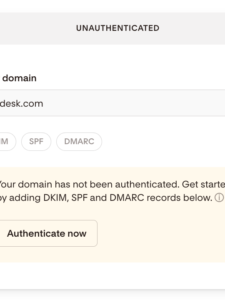
Why You Should Authenticate Your Domain for Flodesk (And How to Do It)
If you’re using Flodesk for email marketing, there’s one important step that often gets overlooked: domain authentication.  It may sound technical, but authenticating your domain is one of the simplest ways to improve your email deliverability, protect your brand reputation, and help your newsletters actually land in inboxes instead of spam folders. At Callan Group Communications, we always recommend setting up domain authentication before launching any major email marketing campaigns. Here’s why it matters and how to get it done. What Does...
May 22, 2026 By Diane MichaelHow Toflodesk helpComments Off
How to Add a Manager to Google My Business Account
Google My Business (GMB) is essential for managing your online presence across Google, including Search and Maps. If you're collaborating with CGC or need help managing your GMB profile, adding a manager is a straightforward process. Here’s how to do it. Steps: Log in to Google My Business: Go to Google My Business. Sign in with the Google account associated with your business. Select Your Business: If you have multiple businesses, choose the one you want to manage from the...
August 26, 2024 By Diane MichaelHow ToAdd Admin to Google My Business, GoogleMyBusinessComments Off
Meta Leads
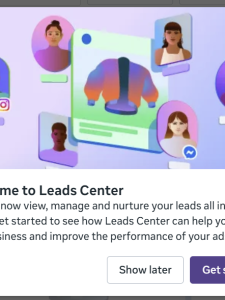
What Are Meta Leads—And Which Ad Objective Should You Be Using?
If you’ve spent any time exploring paid advertising on Facebook or Instagram, you’ve likely come across the term Meta Leads. But what does it actually mean—and more importantly, when should you use it? At Callan Group Communications, we believe in connecting the dots and helping you understand not just what works, but why it works. Let’s break it down. What Are Meta Leads? Meta Leads refer to leads generated directly within the Meta platform (Facebook and Instagram) using built-in lead forms—also known...
April 12, 2026 By Diane MichaelHow ToAdvertising Daytona Beach, AssociationManagement, Callan Group, Callan Group Commnications, CallanGroup, Digital Di, domainhostingdaytona, Facebook, Facebook Follows, InstagramDaytonaBeach, meta, meta ads, meta business, meta leads, Social Media Ormond BeachComments Off
How to Add an Admin to Your YouTube Account
Adding an admin to your YouTube Account allows others to manage your page, post updates, and edit. Here’s a simple guide to adding an admin.   Step 1: Sign in to YouTube Studio Open your web browser and go to YouTube. Click on your profile picture in the top-right corner. Select YouTube Studio from the dropdown menu. Step 2: Access Settings Once you're in YouTube Studio, look to the left-hand menu. Scroll to the bottom and click on Settings (it's a small...
October 29, 2024 By Sally JaducanHow ToComments Off
Google Local Service Ads Set Up
The Ultimate Checklist for Setting Up Google Local Services Ads (LSA)
What Are Google Local Services Ads (LSAs)? Google Local Services Ads put your business at the top of search results for your service area — above traditional Google Ads.   You only pay for real leads (calls or messages), making LSAs one of the most cost-effective local marketing tools available. Step 1: Check Eligibility Not all industries or locations are eligible. Visit Google’s LSA eligibility tool and confirm your service category (plumber, HVAC, electrician, lawyer, etc.) is supported. You’ll also need: An active Google Business...
November 14, 2025 By Diane MichaelHow ToAdvertising Daytona Beach, Callan Group, Callan Group Commnications, google local service ads, googlelocalserviceads, googlelsa, local service ads, localserviceads, lsa, SEODaytona, Social Media Ormond Beach, The Callan GroupComments Off
Doodle image that says "Ad Campagin"
How to Create a Meta Ad Account and Add It to Your Business Portfolio
If you're planning to run Facebook or Instagram ads for your business, one of the first steps is setting up a Meta Ad Account and connecting it to your Business Portfolio. While the process isn't difficult, there are several steps involved, and setting things up correctly from the start can save time and headaches later. Whether you're planning to manage your advertising in-house or work with a marketing agency, here's everything you need to know about creating a Meta Ad...
June 5, 2026 By Diane MichaelHow ToAdvertising Daytona Beach, AssociationManagement, Callan Group, Diane Michael, Don't Be Prehistoric, Marketing Daytona, meta ad manager, meta ads, meta business manager, meta help, The Callan GroupComments Off
How to Add Subtitles and an End Screen to Your Videos on YouTube
If you're creating video content for YouTube, you already know how important it is to keep viewers engaged—and coming back for more. Two of the simplest, most effective ways to do that? Subtitles and end screens. Adding subtitles helps make your content more accessible to a wider audience, including non-native speakers and the hearing impaired. Meanwhile, end screens are powerful tools for keeping viewers on your channel by prompting them to watch more videos, subscribe, or visit your website. Here’s a...
May 1, 2025 By Sally JaducanHow ToComments Off
How to Add an Admin to Your Facebook Business Page
 Adding an admin to your Facebook Business Page allows others to manage your page, post updates, and respond to messages. Here’s a simple guide to adding an admin. Steps: Log in to Facebook: Go to Facebook. Sign in with your credentials. Access Your Business Page: Click on Pages in the left menu, and select the page you want to manage. Switch into the Page: Switching into the Page allows you to act as the page and not from...
August 26, 2024 By Diane MichaelHow ToAdd Admin to Facebook Business, FacebookBusinessAdminComments Off
How to Sign Up for Flodesk and Add Our Affiliate Code
Flodesk is a user-friendly email marketing platform perfect for creating beautiful, engaging emails. Here’s how to sign up and apply CGC's discount code to your subscription. Steps: Visit Flodesk: Go to Flodesk. Sign Up: Click on Sign Up for Free or similar on the homepage. Fill in your details (name, email, password). Check for Verification Email: Go to your inbox and open the verification email from Flodesk. Click to verify your email. This should bring you back...
August 26, 2024 By Diane MichaelHow ToFlodesk Code, Flodesk Newsletters, Sign Up for FlodeskComments Off

Join Our Mailing List

    Let Us Help You

    Connect with us →

    • Facebook
    • Instagram
    • LinkedIn
    • YouTube
    Callan Group Communications
    © 2016-2025 Callan Group Communications. All Rights Reserved.
    Privacy | Site Map